

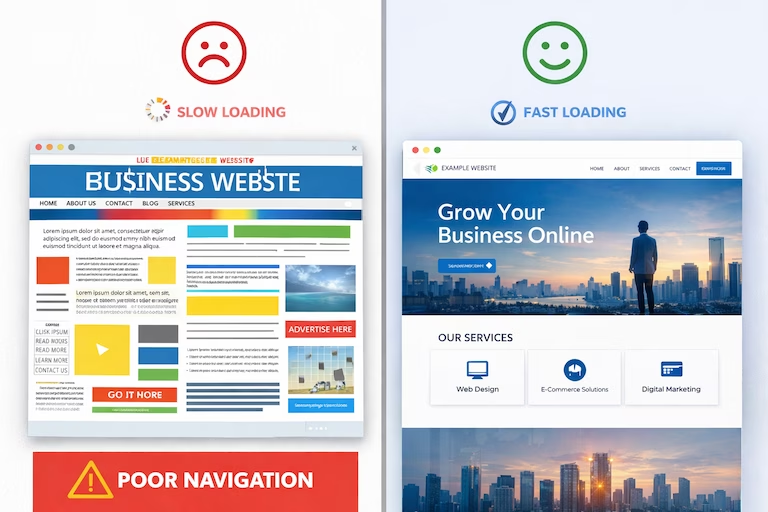
Your website loads. Seven seconds tick by. Your potential customer has already clicked back to Google and chosen your competitor instead.
This isn’t a hypothetical scenario—it’s happening right now to small businesses across the UK. While you’re reading this, customers are judging your business, your credibility, and your professionalism based on a website that might be costing you thousands in lost revenue every single month.
Here’s the uncomfortable truth: in 2026, your website isn’t just a nice-to-have digital brochure. It’s your hardest-working salesperson, your 24/7 storefront, and often the only chance you get to make a first impression. Get it wrong, and you’re invisible. Get it right, and you’ve got a revenue-generating machine that works while you sleep.
Why Web Design Actually Matters for Your Small Business (Beyond Looking Pretty)
Let’s cut through the marketing fluff. You don’t need a beautiful website. You need a website that makes you money.
Research from Stanford University found that 75% of consumers admit to judging a company’s credibility based on their website design. But here’s what matters more: businesses with well-designed websites see conversion rates that are 200-400% higher than those with poor design. That’s not a marginal improvement—that’s the difference between scraping by and genuine growth.
The Real Cost of a Poor Website
Think your outdated website “isn’t that bad”? Consider this:
Lost customers you’ll never know about: For every person who contacts you despite your terrible website, there are probably fifty who bounced immediately and went elsewhere. They won’t tell you. They’ll just buy from someone else.
Lower search rankings: Google’s algorithm actively penalises slow, non-mobile-friendly websites. If your site takes more than 3 seconds to load or looks broken on a phone, you’re being pushed down in search results every single day.
Damaged credibility: When someone lands on a website that looks like it was built in 2010, they don’t think “charming retro aesthetic.” They think “are these people even still in business?” or worse, “is this website safe?”
The Core Elements Every Small Business Website Must Have
Forget the fancy features and gimmicks. Here’s what actually matters:
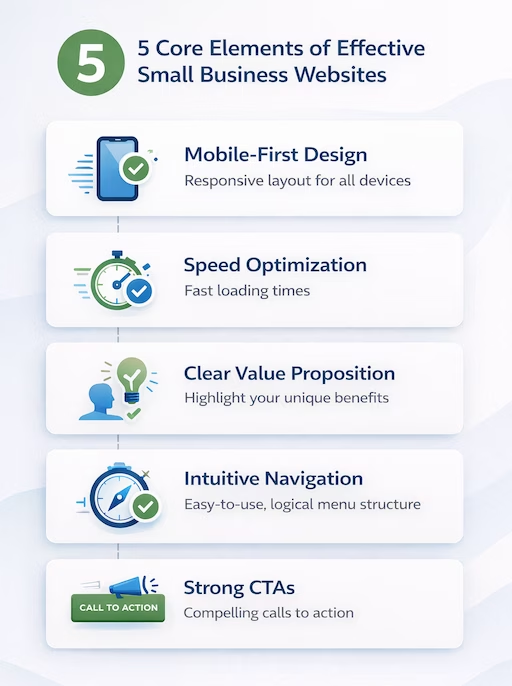
1. Mobile-First Design (Not Mobile-Friendly—Mobile-FIRST)
Over 60% of web traffic now comes from mobile devices. But “mobile-friendly” isn’t good enough anymore. Your website needs to be designed for mobile first, then adapted for desktop.
What this means practically:
- Touch-friendly buttons (no tiny links that require a surgeon’s precision to tap)
- Readable text without zooming (minimum 16px font size)
- Fast loading on 4G connections (under 3 seconds)
- Vertical scrolling that actually makes sense
- Forms that don’t make people want to throw their phone across the room
2. Speed That Actually Matters
Every second of loading time costs you customers. Here’s the data: a 1-second delay in page load time can reduce conversions by 7%. For a small business making £50,000 annually from their website, that’s £3,500 lost. Every. Single. Year.
Your website should load in under 2 seconds. If it doesn’t, you’re leaving money on the table.
Quick wins for speed:
- Compress images (no 5MB photos of your products)
- Use modern image formats (WebP instead of JPEG)
- Enable browser caching
- Choose decent hosting (£5/month hosting is costing you far more in lost sales)
- Minimise plugins and unnecessary scripts
3. Clear Value Proposition Above the Fold
You have about 3 seconds to tell someone why they should care about your business. Not buried halfway down the page. Not hidden in a menu. Right there, immediately visible, when the page loads.
Bad: “Welcome to ABC Solutions, established 2015, providing quality services”
Good: “We fix broken WordPress websites in 24 hours—guaranteed”
Notice the difference? One tells you nothing useful. The other tells you exactly what they do, how fast, and makes a promise.
4. Intuitive Navigation (Your Grandmother Test)
If your grandmother can’t figure out how to find your contact page in under 5 seconds, your navigation is too complicated.
Simple navigation rules:
- Maximum 7 items in your main menu
- Labels that make sense (“Services” not “Solutions Portfolio”)
- Contact information visible on every page
- Search function if you have more than 20 pages
- Breadcrumbs for deeper pages
5. Calls-to-Action That Actually Drive Action
Every page on your website should have a purpose. What do you want visitors to do? Call you? Book a consultation? Download a guide? Make it obvious and make it easy.
Weak CTA: “Learn More”
Strong CTA: “Get Your Free Website Audit (Takes 2 Minutes)”
The difference? Specificity, value, and low commitment.
SEO for Small Business Websites: Beyond the Basics
Here’s what most web designers won’t tell you: a beautiful website that nobody can find is useless. SEO isn’t optional—it’s fundamental.
On-Page SEO Essentials
Title tags that work: Every page needs a unique title tag that includes your target keyword and stays under 60 characters. “Home” as a title tag is throwing away free traffic.
Meta descriptions that sell: These don’t directly affect rankings, but they massively affect click-through rates. Write them like ad copy, not robotic keyword stuffing.
Header hierarchy that makes sense: One H1 per page (your main heading), then H2s for major sections, H3s for subsections. Search engines use this to understand your content structure.
Image optimisation: Every image needs descriptive alt text (for accessibility AND SEO), compressed file sizes, and sensible file names. “IMG_4829.jpg” tells Google nothing. “plumber-fixing-boiler-teesside.jpg” tells Google everything.
Technical SEO You Can’t Ignore
SSL certificate (HTTPS): Non-negotiable in 2026. Google actively penalises non-HTTPS sites, and browsers flag them as “Not Secure.” Would you enter your payment details on a site marked “Not Secure”? Neither will your customers.
XML sitemap: Helps search engines understand your site structure. Generate one, submit it to Google Search Console.
Robots.txt file: Tells search engines which pages to crawl and which to ignore.
Schema markup: Helps search engines understand what your business does, where you’re located, your opening hours, and more. Rich snippets in search results = higher click-through rates.
Local SEO for Small Businesses
If you serve a local area, local SEO is your secret weapon against national competitors.
Google Business Profile: Claim it, optimise it, keep it updated. This is often how customers find you.
Local keywords: Don’t just target “web design”—target “web design Stockton” or “web design North East.”
NAP consistency: Your Name, Address, and Phone number must be identical across your website, Google Business Profile, and every online directory. Inconsistencies confuse Google and hurt your rankings.
Local content: Blog posts about local topics, case studies with local clients, mentions of your area. This signals to Google that you’re relevant for local searches.
Content Strategy: What Should Actually Be On Your Website?
Most small business websites have the same boring pages: Home, About, Services, Contact. That’s the bare minimum. Here’s what you actually need:
Essential Pages
Homepage: Clear value proposition, trust signals (testimonials, client logos), primary services, strong CTA.
Services/Products: Detailed pages for each service you offer. Not one generic “Services” page—individual pages that can rank for specific search terms.
About Us: This isn’t about you—it’s about why customers should trust you. Team photos, credentials, years in business, your story (briefly), and what makes you different.
Contact: Phone number, email, contact form, physical address (if relevant), opening hours, and a map. Make it stupidly easy for people to reach you.
Privacy Policy & Terms: Legal requirements, especially if you’re collecting any customer data.
Pages That Drive Growth
Blog/Resources: Regular, genuinely useful content that targets search keywords and demonstrates expertise. One good blog post can drive traffic for years.
Case Studies: Real examples of how you’ve helped clients. These are conversion gold.
FAQ: Answer the questions you get asked repeatedly. Saves you time AND improves SEO.
Testimonials/Reviews: Social proof is powerful. Dedicated page for customer success stories.
Common Web Design Mistakes Small Businesses Make
Let’s talk about what NOT to do:
Auto-playing videos or music: Nothing makes people close a tab faster. If you have a video, let them choose to play it.
Stock photos of people in suits shaking hands: Everyone knows these are stock photos. They don’t build trust—they destroy it. Use real photos of your actual team and work.
Hiding your pricing: If you’re afraid to show pricing, you’re just pushing customers to call your competitors who do. Be transparent.
Contact forms with 15 required fields: Every field you add reduces conversions. Name, email, message. That’s it.
No clear next step: Every page should guide visitors toward an action. If they finish reading and think “okay, now what?”—you’ve failed.
Ignoring analytics: You can’t improve what you don’t measure. Install Google Analytics and actually look at it monthly.

DIY vs Professional Web Design: What’s Right for Your Business?
The honest answer: it depends on your skills, time, and budget.
When DIY Makes Sense
- You’re just starting out and genuinely can’t afford professional help
- You have time to learn and are reasonably tech-savvy
- Your business is very simple (one service, local area, minimal complexity)
- You’re using the website primarily as a digital business card
Good DIY platforms: WordPress with a quality theme (Astra, GeneratePress), Squarespace, Webflow. Avoid Wix if you care about SEO.
When You Need a Professional
- You’re competing in a crowded market and need to stand out
- You need custom functionality (booking systems, member areas, e-commerce)
- Your time is worth more than the cost of hiring someone
- You want proper SEO from day one
- You need integration with your existing systems (CRM, email marketing, etc.)
A professional web designer doesn’t just make things look pretty—they understand user psychology, conversion optimisation, technical SEO, and how to build a site that actually generates revenue.
What Good Web Design Actually Costs (And Why Cheap Can Be Expensive)
Let’s talk money. Here’s the reality of web design pricing in 2026:
Template-based website: £500-£1,500. Using a pre-made theme with your content and branding. Quick, affordable, limited customisation.
Semi-custom website: £1,500-£5,000. Custom design work within a framework (like WordPress). Most small businesses fit here.
Fully custom website: £5,000-£15,000+. Built from scratch to your exact specifications. Usually overkill for small businesses unless you have very specific needs.
The £200 website from Fiverr? You’ll spend twice that fixing the problems it creates. Cheap web design is expensive when you factor in:
- Poor SEO (missed opportunities for traffic)
- Security vulnerabilities
- Slow loading speeds (lost customers)
- Having to rebuild it properly within a year
Measuring Success: What Actually Matters
A website isn’t successful because it looks nice. It’s successful when it drives business results.
Metrics That Matter
Conversion rate: What percentage of visitors take your desired action? This is THE metric.
Traffic sources: Where are people finding you? Organic search? Social media? Direct traffic? This tells you what’s working.
Bounce rate: Are people leaving immediately? High bounce rates signal problems with your content, speed, or user experience.
Time on page: Are people actually reading your content or bouncing immediately?
Goal completions: Form submissions, phone calls, downloads—whatever your goals are, track them.
Metrics That Don’t Matter (As Much As You Think)
Total traffic: 10,000 visitors who don’t convert is worse than 100 visitors who do.
Page views: Nice to know, but ultimately irrelevant if those views don’t lead to business outcomes.
Social media likes: Unless they’re driving actual traffic and conversions, they’re vanity metrics.
Maintaining Your Website: It’s Never “Done”
A website isn’t a one-and-done project. It needs regular maintenance:
- Security updates: WordPress, plugins, and themes need regular updates to patch vulnerabilities
- Content updates: Fresh content signals to Google that your site is active and relevant
- Performance monitoring: Speed degrades over time—keep an eye on it
- Broken link checks: Nothing screams “abandoned website” like broken links
- Backup strategy: Regular automated backups. When (not if) something goes wrong, you’ll be glad you have them
Budget for ongoing maintenance or learn to do it yourself. A neglected website becomes a liability.
Your Next Steps: From Reading to Action
Knowledge without action is just entertainment. Here’s your practical next steps:
This week:
- Test your website speed using Google PageSpeed Insights
- Check how it looks on your phone (honestly, critically)
- Ask three people who don’t know your business to visit your site and tell you what you do—if they can’t, you’ve got a messaging problem
This month:
- Set up Google Analytics if you haven’t already
- Claim and optimise your Google Business Profile
- Write down three specific, measurable goals for your website
- Get three quotes from web designers or commit to learning DIY properly
This quarter:
- Either launch a new website or significantly improve your existing one
- Create a content calendar for regular blog posts
- Set up conversion tracking for your key goals
- Review your analytics monthly and actually make changes based on what you learn
Your website should be working for you, not against you. Every day you wait is another day of missed opportunities, lost customers, and wasted potential.
The small businesses that thrive in 2026 won’t be the ones with the biggest budgets—they’ll be the ones who understand that their website is an investment, not an expense. The ones who measure results, iterate constantly, and treat their online presence with the same importance as their physical location.
Your competitor already has a better website than you. The question is: how long are you going to let that continue?
At Captivating.co, we specialise in building websites for small businesses across the North East that actually generate results. No fluff, no overpriced packages, no lengthy timelines. Just professional web design that works. If you’re ready to stop losing customers to your website and start gaining them, let’s talk.
